

Question 191
You have an Azure subscription that is linked to a Microsoft Entra tenant named contoso.com. The subscription contains a group named Group1 and a virtual machine named VM1.
You need to meet the following requirements:
* Enable a system-assigned managed identity for VM1.
* AddVM1 to Group1.
How should you complete the PowerShell script? To answer, drag the appropriate cmdlets to the correct targets. Each cmdlet may be used once, more than once, or not at all. You may need to drag the split bar between panes or scroll to view content.
NOTE: Each correct selection is worth one point.

You need to meet the following requirements:
* Enable a system-assigned managed identity for VM1.
* AddVM1 to Group1.
How should you complete the PowerShell script? To answer, drag the appropriate cmdlets to the correct targets. Each cmdlet may be used once, more than once, or not at all. You may need to drag the split bar between panes or scroll to view content.
NOTE: Each correct selection is worth one point.


Question 192
You have a Microsoft 365 tenant.
The Azure Active Directory (Azure AD) tenant syncs to an on-premises Active Directory domain.
You plan to create an emergency-access administrative account named Emergency1.
Emergency1 will be assigned the Global administrator role in Azure AD. Emergency1 will be used in the event of Azure AD functionality failures and on-premises infrastructure failures.
You need to reduce the likelihood that Emergency1 will be prevented from signing in during an emergency.
What should you do?
The Azure Active Directory (Azure AD) tenant syncs to an on-premises Active Directory domain.
You plan to create an emergency-access administrative account named Emergency1.
Emergency1 will be assigned the Global administrator role in Azure AD. Emergency1 will be used in the event of Azure AD functionality failures and on-premises infrastructure failures.
You need to reduce the likelihood that Emergency1 will be prevented from signing in during an emergency.
What should you do?
Question 193
You have a Microsoft Entra tenant that contains the users shown in the following table.

You add the following assignment for the User Administrator role:
* Scope type: Directory
* Selected members: Group1
* Assignment type: Active
* Assignments starts August 15. 2022
* Assignment ends: December 15, 2022
You add the following assignment for the Exchange Administrator role:
* Scope type: Directory
* Selected members: Group2
* Assignment type: Eligible
* Assignments starts: October 15, 2022
* Assignment ends: January 15. 2023
For each of the following statements, select Yes if the statement is true. Otherwise, select No.
NOTE: Each correct selection is worth one point.

You add the following assignment for the User Administrator role:
* Scope type: Directory
* Selected members: Group1
* Assignment type: Active
* Assignments starts August 15. 2022
* Assignment ends: December 15, 2022
You add the following assignment for the Exchange Administrator role:
* Scope type: Directory
* Selected members: Group2
* Assignment type: Eligible
* Assignments starts: October 15, 2022
* Assignment ends: January 15. 2023
For each of the following statements, select Yes if the statement is true. Otherwise, select No.
NOTE: Each correct selection is worth one point.


Question 194
You have an Azure Active Directory (Azure AD) tenant that contains Azure AD Privileged Identity Management (PIM) role settings for the User administrator role as shown in the following exhibit.
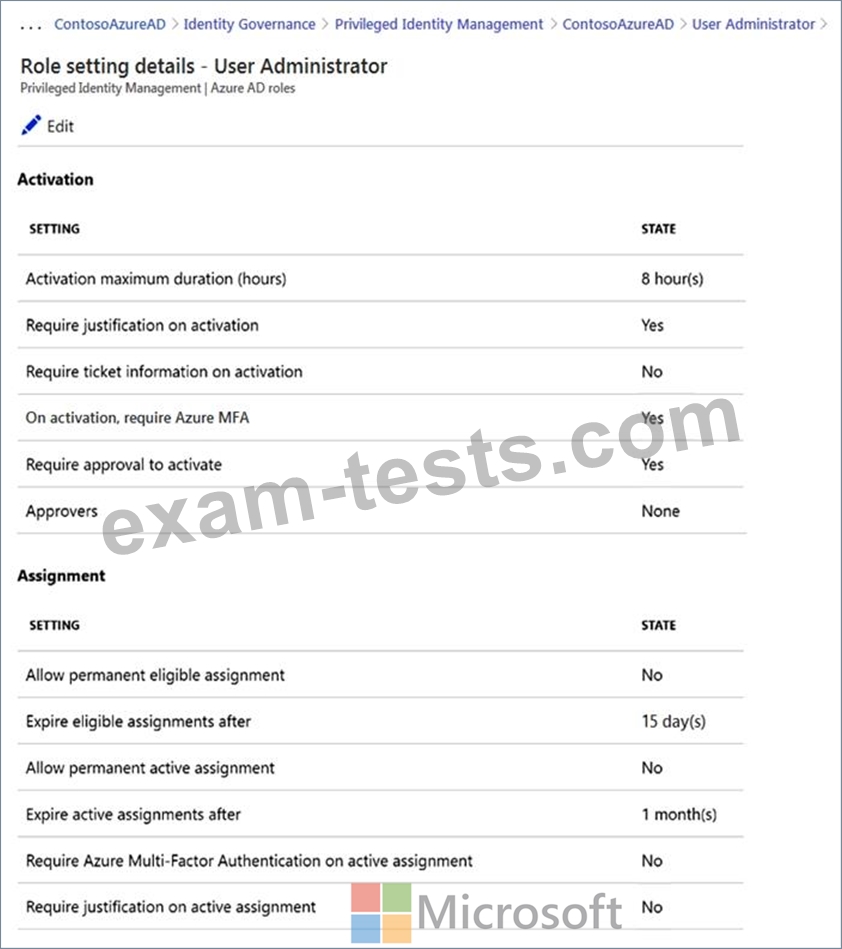
Use the drop-down menus to select the answer choice that completes each statement based on the information presented in the graphic.
NOTE: Each correct selection is worth one point.
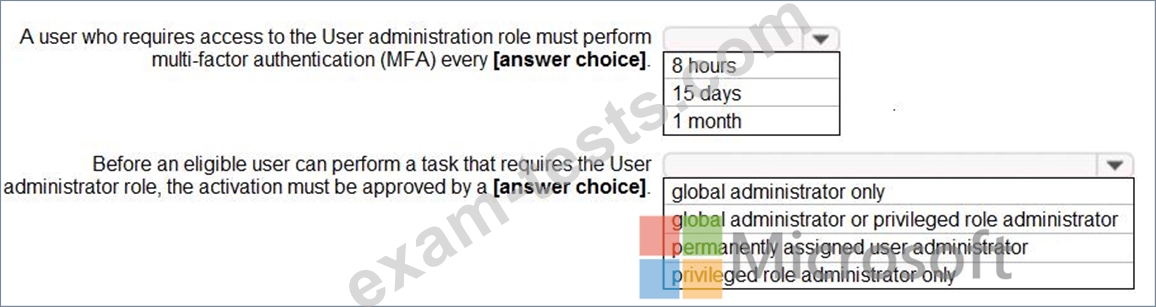
Use the drop-down menus to select the answer choice that completes each statement based on the information presented in the graphic.
NOTE: Each correct selection is worth one point.

Question 195
You have 2,500 users who are assigned Microsoft Office 365 Enterprise E3 licenses. The licenses are assigned to individual users.
From the Groups blade in the Azure Active Directory admin center, you assign Microsoft Office
365 Enterprise E5 licenses to a group that includes all users.
You need to remove the Office 365 Enterprise E3 licenses from the users by using the least amount of administrative effort.
What should you use?
From the Groups blade in the Azure Active Directory admin center, you assign Microsoft Office
365 Enterprise E5 licenses to a group that includes all users.
You need to remove the Office 365 Enterprise E3 licenses from the users by using the least amount of administrative effort.
What should you use?