Question 46
You have a Microsoft 36S ES subscription that contains two Windows devices named Devicel1and Device2 Device1 has the default browser set to Microsoft Edge. Devke2 has the default browser set to Google Chrome.
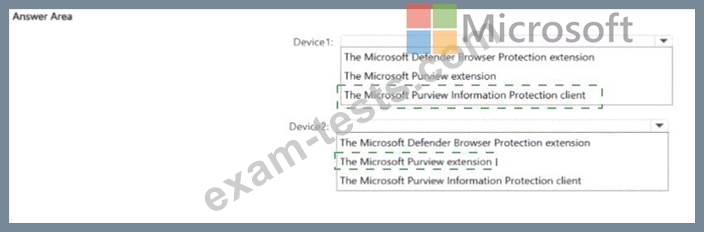
You need to ensure that Microsoft Purview insider risk management can collect signals when a user copies files to a USB device by using their default browser.
What should you deploy to each device? To answer, select the appropriate options in the answer area.
NOTE: Each correct selection is worth one point.

You need to ensure that Microsoft Purview insider risk management can collect signals when a user copies files to a USB device by using their default browser.
What should you deploy to each device? To answer, select the appropriate options in the answer area.
NOTE: Each correct selection is worth one point.

Question 47
You have a Microsoft 365 alert named Alert2 as shown in the following exhibit.

You need to manage the status of Alert? To which status can you change Alette?
You need to manage the status of Alert? To which status can you change Alette?
Question 48
Note: This question is part of a series of questions that present the same scenario. Each question in the series contains a unique solution that might meet the stated goals. Some question sets might have more than one correct solution, while others might not have a correct solution.
After you answer a question in this section, you will NOT be able to return to it. As a result, these questions will not appear in the review screen.
You have a Microsoft 365 tenant and 500 computers that run Windows 11. The computers are onboarded to Microsoft Purview.
You discover that a third-party application named Tailspin_scanner.exe accessed protected sensitive information on multiple computers. Tailspin_scanner.exe is installed locally on the computers.
You need to block Tailspin_scanner.exe from accessing sensitive documents without preventing the application from accessing other documents.
Solution: From the Microsoft 365 Endpoint data loss prevention (Endpoint DLP) settings, you add a folder path to the file path exclusions.
Does this meet the goal?
After you answer a question in this section, you will NOT be able to return to it. As a result, these questions will not appear in the review screen.
You have a Microsoft 365 tenant and 500 computers that run Windows 11. The computers are onboarded to Microsoft Purview.
You discover that a third-party application named Tailspin_scanner.exe accessed protected sensitive information on multiple computers. Tailspin_scanner.exe is installed locally on the computers.
You need to block Tailspin_scanner.exe from accessing sensitive documents without preventing the application from accessing other documents.
Solution: From the Microsoft 365 Endpoint data loss prevention (Endpoint DLP) settings, you add a folder path to the file path exclusions.
Does this meet the goal?
Question 49
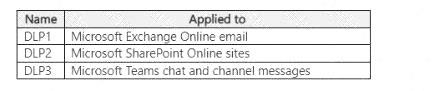
You have a Microsoft 365 E5 subscription that contains the data loss prevention (DLP) policies shown in the following table.
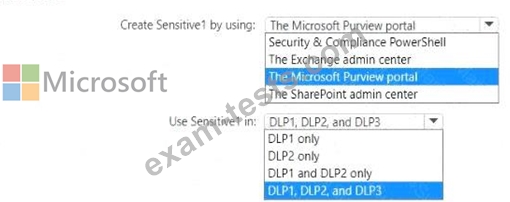
You have a custom employee information form named Template1 .docx.
You plan to create a sensitive info type named Sensitive! that will use the document fingerprint from Template1.docx.
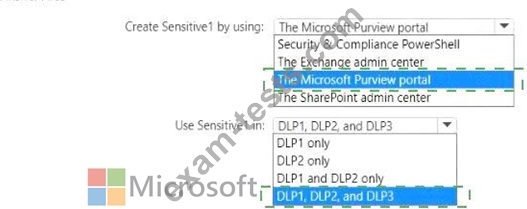
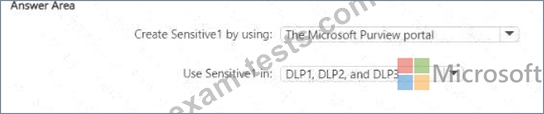
What should you use to create Sensitive1, and in which DLP policies can you use Sensitive1? To answer, select the appropriate options in the answer area.
NOTE: Each correct selection is worth one point.
You have a custom employee information form named Template1 .docx.
You plan to create a sensitive info type named Sensitive! that will use the document fingerprint from Template1.docx.
What should you use to create Sensitive1, and in which DLP policies can you use Sensitive1? To answer, select the appropriate options in the answer area.
NOTE: Each correct selection is worth one point.
Question 50
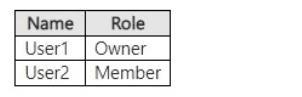
You have a Microsoft SharePoint Online site named Site1 that has the users shown in the following table.
You create the retention labels shown in the following table.

You publish the retention labels to Site1.
On March 1,2023, you assign the retention labels to the files shown in the following table.

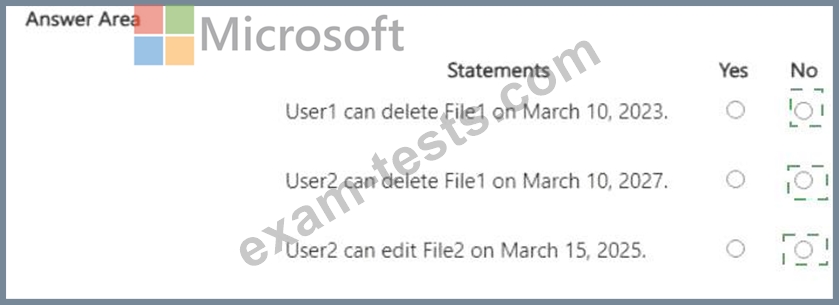
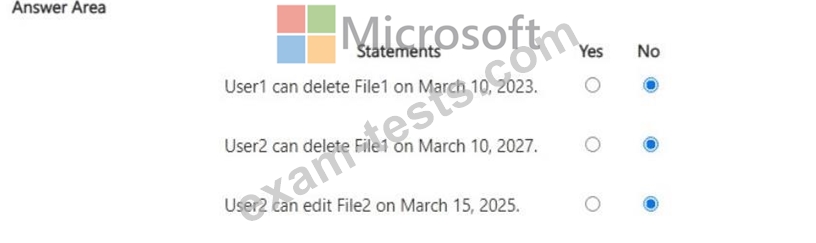
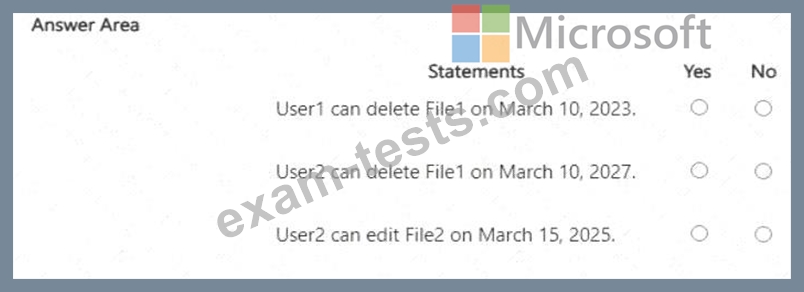
For each of the following statements, select Yes if the statement is true. Otherwise, select No.
NOTE: Each correct selection is worth one point.
You create the retention labels shown in the following table.
You publish the retention labels to Site1.
On March 1,2023, you assign the retention labels to the files shown in the following table.
For each of the following statements, select Yes if the statement is true. Otherwise, select No.
NOTE: Each correct selection is worth one point.