

Question 36
You have a Microsoft 365 E5 tenant that uses a domain named contoso.com.
A user named User 1 sends link based, branded emails that are encrypted by using Microsoft Purview Advanced Message Encryption to the recipients shown in the following table.

For which recipients Can User1 revoke the emails?
A user named User 1 sends link based, branded emails that are encrypted by using Microsoft Purview Advanced Message Encryption to the recipients shown in the following table.
For which recipients Can User1 revoke the emails?
Question 37
SIMULATION
Username and password
Use the following login credentials as needed:
To enter your username, place your cursor in the Sign in box and select the username below.
To enter your password, place your cursor in the Enter password box and select the password below.
Microsoft 365 Username:
[email protected]
Microsoft 365 Password: XXXXXXXXX
If the Microsoft Edge browser or Microsoft 365 portal does not load successfully, select the Microsoft Edge browser icon from the task bar, type the URL "https://admin.microsoft.com", and press Enter.
The following information is for technical support purposes only:
Lab Instance: XXXXXXXXX
Task 1
You plan to implement Endpoint data loss prevention (Endpoint DLP). You plan to create a policy that will restrict OneDrive.exe from accessing files that have the Highly Confidential sensitivity label.
You need to configure the Endpoint DLP settings so that onedrive.exe actions can be restricted by a DLP policy.
You do NOT need to create a DLP policy at this time.
Username and password
Use the following login credentials as needed:
To enter your username, place your cursor in the Sign in box and select the username below.
To enter your password, place your cursor in the Enter password box and select the password below.
Microsoft 365 Username:
[email protected]
Microsoft 365 Password: XXXXXXXXX
If the Microsoft Edge browser or Microsoft 365 portal does not load successfully, select the Microsoft Edge browser icon from the task bar, type the URL "https://admin.microsoft.com", and press Enter.
The following information is for technical support purposes only:
Lab Instance: XXXXXXXXX
Task 1
You plan to implement Endpoint data loss prevention (Endpoint DLP). You plan to create a policy that will restrict OneDrive.exe from accessing files that have the Highly Confidential sensitivity label.
You need to configure the Endpoint DLP settings so that onedrive.exe actions can be restricted by a DLP policy.
You do NOT need to create a DLP policy at this time.
Question 38
Hotspot Question
You have a Microsoft 365 E5 subscription that contains the device configurations shown in the following table.
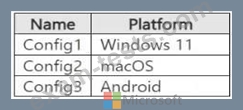
Each configuration uses either Google Chrome or Firefox as a default browser.
You need to implement Microsoft Purview and deploy the Microsoft Purview browser extension to the configurations.
To which configuration can each extension be deployed? To answer, select the appropriate options in the answer area.
NOTE: Each correct selection is worth one point.

You have a Microsoft 365 E5 subscription that contains the device configurations shown in the following table.
Each configuration uses either Google Chrome or Firefox as a default browser.
You need to implement Microsoft Purview and deploy the Microsoft Purview browser extension to the configurations.
To which configuration can each extension be deployed? To answer, select the appropriate options in the answer area.
NOTE: Each correct selection is worth one point.

Question 39
You have a Microsoft 365 E5 subscription that contains a user named User1.
You deploy Microsoft Purview insider risk management.
You need ensure that insider risk management events related to User1 are visible only to specific users.
What should you create?
You deploy Microsoft Purview insider risk management.
You need ensure that insider risk management events related to User1 are visible only to specific users.
What should you create?
Question 40
Hotspot Question
You have a Microsoft 365 E5 subscription that contains three DOCX files named File1, File2, and File3.
You create the sensitivity labels shown in the following table.

You apply the labels to the files as shown in the following table.

You ask Microsoft 365 Copilot to summarize the files, and you receive the results shown in the following table.

For each of the following statements, select Yes if the statement is true. Otherwise, select No.
NOTE: Each correct selection is worth one point.

You have a Microsoft 365 E5 subscription that contains three DOCX files named File1, File2, and File3.
You create the sensitivity labels shown in the following table.
You apply the labels to the files as shown in the following table.
You ask Microsoft 365 Copilot to summarize the files, and you receive the results shown in the following table.
For each of the following statements, select Yes if the statement is true. Otherwise, select No.
NOTE: Each correct selection is worth one point.
