
- Home
- Cisco Certification
- 350-701 Exam
- Cisco.350-701.v2022-10-19.q571 Practice Test

Question 376
Refer to the exhibit.
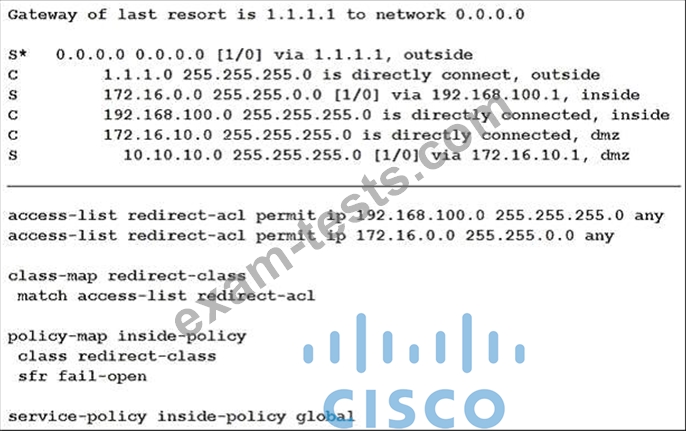
What is a result of the configuration?
What is a result of the configuration?
Correct Answer: D
The purpose of above commands is to redirect traffic that matches the ACL "redirect-acl" to the Cisco FirePOWER (SFR) module in the inline (normal) mode. In this mode, after the undesired traffic is dropped and any other actions that are applied by policy are performed, the traffic is returned to the ASA for further processing and ultimate transmission. The command "service-policy global_policy global" applies the policy to all of the interfaces. Reference: https://www.cisco.com/c/en/us/support/docs/security/asa-firepower-services/118644-configurefirepower-00.html FirePOWER (SFR) module in the inline (normal) mode. In this mode, after the undesired traffic is dropped and any other actions that are applied by policy are performed, the traffic is returned to the ASA for further processing and ultimate transmission.
The command "service-policy global_policy global" applies the policy to all of the interfaces.
The purpose of above commands is to redirect traffic that matches the ACL "redirect-acl" to the Cisco FirePOWER (SFR) module in the inline (normal) mode. In this mode, after the undesired traffic is dropped and any other actions that are applied by policy are performed, the traffic is returned to the ASA for further processing and ultimate transmission. The command "service-policy global_policy global" applies the policy to all of the interfaces. Reference: https://www.cisco.com/c/en/us/support/docs/security/asa-firepower-services/118644-configurefirepower-00.html
The command "service-policy global_policy global" applies the policy to all of the interfaces.
The purpose of above commands is to redirect traffic that matches the ACL "redirect-acl" to the Cisco FirePOWER (SFR) module in the inline (normal) mode. In this mode, after the undesired traffic is dropped and any other actions that are applied by policy are performed, the traffic is returned to the ASA for further processing and ultimate transmission. The command "service-policy global_policy global" applies the policy to all of the interfaces. Reference: https://www.cisco.com/c/en/us/support/docs/security/asa-firepower-services/118644-configurefirepower-00.html
Question 377
An organization has noticed an increase in malicious content downloads and wants to use Cisco Umbrella to prevent this activity for suspicious domains while allowing normal web traffic. Which action will accomplish this task?
Correct Answer: B
Obviously, if you allow all traffic to these risky domains, users might access malicious content, resulting in an infection or data leak. But if you block traffic, you can expect false positives, an increase in support inquiries, and thus, more headaches. By only proxying risky domains, the intelligent proxy delivers more granular visibility and control.
The intelligent proxy bridges the gap by allowing access to most known good sites without being proxied and only proxying those that pose a potential risk. The proxy then filters and blocks against specific URLs hosting malware while allowing access to everything else.
Obviously, if you allow all traffic to these risky domains, users might access malicious content, resulting in an infection or data leak. But if you block traffic, you can expect false positives, an increase in support inquiries, and thus, more headaches. By only proxying risky domains, the intelligent proxy delivers more granular visibility and control.
The intelligent proxy bridges the gap by allowing access to most known good sites without being proxied and only proxying those that pose a potential risk. The proxy then filters and blocks against specific URLs hosting malware while allowing access to everything else.
Obviously, if you allow all traffic to these risky domains, users might access malicious content, resulting in an infection or data leak. But if you block traffic, you can expect false positives, an increase in support inquiries, and thus, more headaches. By only proxying risky domains, the intelligent proxy delivers more granular visibility and control.
The intelligent proxy bridges the gap by allowing access to most known good sites without being proxied and only proxying those that pose a potential risk. The proxy then filters and blocks against specific URLs hosting malware while allowing access to everything else.
The intelligent proxy bridges the gap by allowing access to most known good sites without being proxied and only proxying those that pose a potential risk. The proxy then filters and blocks against specific URLs hosting malware while allowing access to everything else.
Obviously, if you allow all traffic to these risky domains, users might access malicious content, resulting in an infection or data leak. But if you block traffic, you can expect false positives, an increase in support inquiries, and thus, more headaches. By only proxying risky domains, the intelligent proxy delivers more granular visibility and control.
The intelligent proxy bridges the gap by allowing access to most known good sites without being proxied and only proxying those that pose a potential risk. The proxy then filters and blocks against specific URLs hosting malware while allowing access to everything else.
Obviously, if you allow all traffic to these risky domains, users might access malicious content, resulting in an infection or data leak. But if you block traffic, you can expect false positives, an increase in support inquiries, and thus, more headaches. By only proxying risky domains, the intelligent proxy delivers more granular visibility and control.
The intelligent proxy bridges the gap by allowing access to most known good sites without being proxied and only proxying those that pose a potential risk. The proxy then filters and blocks against specific URLs hosting malware while allowing access to everything else.
Question 378
What are two benefits of Flexible NetFlow records? (Choose two)
Correct Answer: A,C
Explanation Explanation NetFlow is typically used for several key customer applications, including the following: ... Billing and accounting. NetFlow data provides fine-grained metering (for instance, flow data includes details such as IP addresses, packet and byte counts, time stamps, type of service (ToS), and application ports) for highly flexible and detailed resource utilization accounting. Service providers may use the information for billing based on time of day, bandwidth usage, application usage, quality of service, and so on. Enterprise customers may use the information for departmental charge back or cost allocation for resource utilization. Reference: https://www.cisco.com/c/en/us/td/docs/ios-xml/ios/fnetflow/configuration/15-mt/fnf-15-mt-book/fnffnetflow.html If the predefined Flexible NetFlow records are not suitable for your traffic requirements, you can create a userdefined (custom) record using the Flexible NetFlow collect and match commands. Before you can create a customized record, you must decide the criteria that you are going to use for the key and nonkey fields. Reference: https://www.cisco.com/en/US/docs/ios/fnetflow/configuration/guide/ cust_fnflow_rec_mon_external_docbase_0900e4b18055d0d2_4container_external_docbase_0900e4b181b413 d9.html#wp1057997 Note: Traditional NetFlow allows us to monitor from Layer 2 to 4 but Flexible NetFlow goes beyond these layers.
Explanation
NetFlow is typically used for several key customer applications, including the following:
...
Billing and accounting. NetFlow data provides fine-grained metering (for instance, flow data includes details such as IP addresses, packet and byte counts, time stamps, type of service (ToS), and application ports) for highly flexible and detailed resource utilization accounting. Service providers may use the information for billing based on time of day, bandwidth usage, application usage, quality of service, and so on. Enterprise customers may use the information for departmental charge back or cost allocation for resource utilization.
Reference:
If the predefined Flexible NetFlow records are not suitable for your traffic requirements, you can create a userdefined (custom) record using the Flexible NetFlow collect and match commands. Before you can create a customized record, you must decide the criteria that you are going to use for the key and nonkey fields.
cust_fnflow_rec_mon_external_docbase_0900e4b18055d0d2_4container_external_docbase_0900e4b181b413 d9.html#wp1057997 Note: Traditional NetFlow allows us to monitor from Layer 2 to 4 but Flexible NetFlow goes beyond these Explanation Explanation NetFlow is typically used for several key customer applications, including the following: ... Billing and accounting. NetFlow data provides fine-grained metering (for instance, flow data includes details such as IP addresses, packet and byte counts, time stamps, type of service (ToS), and application ports) for highly flexible and detailed resource utilization accounting. Service providers may use the information for billing based on time of day, bandwidth usage, application usage, quality of service, and so on. Enterprise customers may use the information for departmental charge back or cost allocation for resource utilization. Reference: https://www.cisco.com/c/en/us/td/docs/ios-xml/ios/fnetflow/configuration/15-mt/fnf-15-mt-book/fnffnetflow.html If the predefined Flexible NetFlow records are not suitable for your traffic requirements, you can create a userdefined (custom) record using the Flexible NetFlow collect and match commands. Before you can create a customized record, you must decide the criteria that you are going to use for the key and nonkey fields. Reference: https://www.cisco.com/en/US/docs/ios/fnetflow/configuration/guide/ cust_fnflow_rec_mon_external_docbase_0900e4b18055d0d2_4container_external_docbase_0900e4b181b413 d9.html#wp1057997 Note: Traditional NetFlow allows us to monitor from Layer 2 to 4 but Flexible NetFlow goes beyond these layers.
Explanation
NetFlow is typically used for several key customer applications, including the following:
...
Billing and accounting. NetFlow data provides fine-grained metering (for instance, flow data includes details such as IP addresses, packet and byte counts, time stamps, type of service (ToS), and application ports) for highly flexible and detailed resource utilization accounting. Service providers may use the information for billing based on time of day, bandwidth usage, application usage, quality of service, and so on. Enterprise customers may use the information for departmental charge back or cost allocation for resource utilization.
Reference:
If the predefined Flexible NetFlow records are not suitable for your traffic requirements, you can create a userdefined (custom) record using the Flexible NetFlow collect and match commands. Before you can create a customized record, you must decide the criteria that you are going to use for the key and nonkey fields.
cust_fnflow_rec_mon_external_docbase_0900e4b18055d0d2_4container_external_docbase_0900e4b181b413 d9.html#wp1057997 Note: Traditional NetFlow allows us to monitor from Layer 2 to 4 but Flexible NetFlow goes beyond these Explanation Explanation NetFlow is typically used for several key customer applications, including the following: ... Billing and accounting. NetFlow data provides fine-grained metering (for instance, flow data includes details such as IP addresses, packet and byte counts, time stamps, type of service (ToS), and application ports) for highly flexible and detailed resource utilization accounting. Service providers may use the information for billing based on time of day, bandwidth usage, application usage, quality of service, and so on. Enterprise customers may use the information for departmental charge back or cost allocation for resource utilization. Reference: https://www.cisco.com/c/en/us/td/docs/ios-xml/ios/fnetflow/configuration/15-mt/fnf-15-mt-book/fnffnetflow.html If the predefined Flexible NetFlow records are not suitable for your traffic requirements, you can create a userdefined (custom) record using the Flexible NetFlow collect and match commands. Before you can create a customized record, you must decide the criteria that you are going to use for the key and nonkey fields. Reference: https://www.cisco.com/en/US/docs/ios/fnetflow/configuration/guide/ cust_fnflow_rec_mon_external_docbase_0900e4b18055d0d2_4container_external_docbase_0900e4b181b413 d9.html#wp1057997 Note: Traditional NetFlow allows us to monitor from Layer 2 to 4 but Flexible NetFlow goes beyond these layers.
Question 379
What is a characteristic of a bridge group in ASA Firewall transparent mode?
Correct Answer: A
Explanation Explanation A bridge group is a group of interfaces that the ASA bridges instead of routes. Bridge groups are only supported in Transparent Firewall Mode. Like any other firewall interfaces, access control between interfaces is controlled, and all of the usual firewall checks are in place. Each bridge group includes a Bridge Virtual Interface (BVI). The ASA uses the BVI IP address as the source address for packets originating from the bridge group. The BVI IP address must be on the same subnet as the bridge group member interfaces. The BVI does not support traffic on secondary networks; only traffic on the same network as the BVI IP address is supported. You can include multiple interfaces per bridge group. If you use more than 2 interfaces per bridge group, you can control communication between multiple segments on the same network, and not just between inside and outside. For example, if you have three inside segments that you do not want to communicate with each other, you can put each segment on a separate interface, and only allow them to communicate with the outside interface. Or you can customize the access rules between interfaces to allow only as much access as desired. Reference: https://www.cisco.com/c/en/us/td/docs/security/asa/asa95/configuration/general/asa-95-generalconfig/intro-fw.html Note: BVI interface is not used for management purpose. But we can add a separate Management slot/port interface that is not part of any bridge group, and that allows only management traffic to the ASA.
Explanation
A bridge group is a group of interfaces that the ASA bridges instead of routes. Bridge groups are only supported in Transparent Firewall Mode. Like any other firewall interfaces, access control between interfaces is controlled, and all of the usual firewall checks are in place.
Each bridge group includes a Bridge Virtual Interface (BVI). The ASA uses the BVI IP address as the source address for packets originating from the bridge group. The BVI IP address must be on the same subnet as the bridge group member interfaces. The BVI does not support traffic on secondary networks; only traffic on the same network as the BVI IP address is supported.
You can include multiple interfaces per bridge group. If you use more than 2 interfaces per bridge group, you can control communication between multiple segments on the same network, and not just between inside and outside. For example, if you have three inside segments that you do not want to communicate with each other, you can put each segment on a separate interface, and only allow them to communicate with the outside interface. Or you can customize the access rules between interfaces to allow only as much access as desired.
Reference:
Explanation Explanation A bridge group is a group of interfaces that the ASA bridges instead of routes. Bridge groups are only supported in Transparent Firewall Mode. Like any other firewall interfaces, access control between interfaces is controlled, and all of the usual firewall checks are in place. Each bridge group includes a Bridge Virtual Interface (BVI). The ASA uses the BVI IP address as the source address for packets originating from the bridge group. The BVI IP address must be on the same subnet as the bridge group member interfaces. The BVI does not support traffic on secondary networks; only traffic on the same network as the BVI IP address is supported. You can include multiple interfaces per bridge group. If you use more than 2 interfaces per bridge group, you can control communication between multiple segments on the same network, and not just between inside and outside. For example, if you have three inside segments that you do not want to communicate with each other, you can put each segment on a separate interface, and only allow them to communicate with the outside interface. Or you can customize the access rules between interfaces to allow only as much access as desired. Reference: https://www.cisco.com/c/en/us/td/docs/security/asa/asa95/configuration/general/asa-95-generalconfig/intro-fw.html Note: BVI interface is not used for management purpose. But we can add a separate Management slot/port interface that is not part of any bridge group, and that allows only management traffic to the ASA.
Explanation
A bridge group is a group of interfaces that the ASA bridges instead of routes. Bridge groups are only supported in Transparent Firewall Mode. Like any other firewall interfaces, access control between interfaces is controlled, and all of the usual firewall checks are in place.
Each bridge group includes a Bridge Virtual Interface (BVI). The ASA uses the BVI IP address as the source address for packets originating from the bridge group. The BVI IP address must be on the same subnet as the bridge group member interfaces. The BVI does not support traffic on secondary networks; only traffic on the same network as the BVI IP address is supported.
You can include multiple interfaces per bridge group. If you use more than 2 interfaces per bridge group, you can control communication between multiple segments on the same network, and not just between inside and outside. For example, if you have three inside segments that you do not want to communicate with each other, you can put each segment on a separate interface, and only allow them to communicate with the outside interface. Or you can customize the access rules between interfaces to allow only as much access as desired.
Reference:
Explanation Explanation A bridge group is a group of interfaces that the ASA bridges instead of routes. Bridge groups are only supported in Transparent Firewall Mode. Like any other firewall interfaces, access control between interfaces is controlled, and all of the usual firewall checks are in place. Each bridge group includes a Bridge Virtual Interface (BVI). The ASA uses the BVI IP address as the source address for packets originating from the bridge group. The BVI IP address must be on the same subnet as the bridge group member interfaces. The BVI does not support traffic on secondary networks; only traffic on the same network as the BVI IP address is supported. You can include multiple interfaces per bridge group. If you use more than 2 interfaces per bridge group, you can control communication between multiple segments on the same network, and not just between inside and outside. For example, if you have three inside segments that you do not want to communicate with each other, you can put each segment on a separate interface, and only allow them to communicate with the outside interface. Or you can customize the access rules between interfaces to allow only as much access as desired. Reference: https://www.cisco.com/c/en/us/td/docs/security/asa/asa95/configuration/general/asa-95-generalconfig/intro-fw.html Note: BVI interface is not used for management purpose. But we can add a separate Management slot/port interface that is not part of any bridge group, and that allows only management traffic to the ASA.
Question 380
Which two actions does the Cisco Identity Services Engine posture module provide that ensures endpoint security?(Choose two.)
Correct Answer: C,E
- Other Version
- 1538Cisco.350-701.v2025-10-04.q562
- 1079Cisco.350-701.v2025-06-19.q238
- 1569Cisco.350-701.v2024-12-18.q472
- 2736Cisco.350-701.v2023-08-01.q405
- 3451Cisco.350-701.v2023-05-04.q372
- 2368Cisco.350-701.v2023-03-16.q218
- 7278Cisco.350-701.v2022-07-08.q453
- 4202Cisco.350-701.v2022-02-02.q204
- 116Cisco.Prepawaypdf.350-701.v2021-12-15.by.ellen.316q.pdf
- Latest Upload
- 115EC-COUNCIL.312-76.v2026-01-03.q103
- 118PaloAltoNetworks.PSE-Cortex-Pro-24.v2026-01-03.q62
- 107MedicalTests.AAPC-CPC.v2026-01-03.q50
- 116SAP.C_S4CPB_2502.v2026-01-03.q43
- 129USGBC.LEED-AP-Homes.v2026-01-02.q36
- 115SAP.C-THR94-2505.v2026-01-02.q29
- 137MedicalProfessional.CHFM.v2026-01-01.q37
- 116SAP.C-BCSPM-2502.v2026-01-01.q9
- 118Microsoft.MB-335.v2026-01-01.q142
- 124SAP.C_THR70_2505.v2026-01-01.q55
[×]
Download PDF File
Enter your email address to download Cisco.350-701.v2022-10-19.q571 Practice Test