

Question 21
Context

Task:
Create a Deployment named expose in the existing ckad00014 namespace running 6 replicas of a Pod. Specify a single container using the ifccncf/nginx: 1.13.7 image Add an environment variable named NGINX_PORT with the value 8001 to the container then expose port 8001
Task:
Create a Deployment named expose in the existing ckad00014 namespace running 6 replicas of a Pod. Specify a single container using the ifccncf/nginx: 1.13.7 image Add an environment variable named NGINX_PORT with the value 8001 to the container then expose port 8001


Question 22
Exhibit:

Context
You are tasked to create a secret and consume the secret in a pod using environment variables as follow:
Task
* Create a secret named another-secret with a key/value pair; key1/value4
* Start an nginx pod named nginx-secret using container image nginx, and add an environment variable exposing the value of the secret key key 1, using COOL_VARIABLE as the name for the environment variable inside the pod
Context
You are tasked to create a secret and consume the secret in a pod using environment variables as follow:
Task
* Create a secret named another-secret with a key/value pair; key1/value4
* Start an nginx pod named nginx-secret using container image nginx, and add an environment variable exposing the value of the secret key key 1, using COOL_VARIABLE as the name for the environment variable inside the pod
Question 23
Exhibit:
Task
You have rolled out a new pod to your infrastructure and now you need to allow it to communicate with the web and storage pods but nothing else. Given the running pod kdsn00201 -newpod edit it to use a network policy that will allow it to send and receive traffic only to and from the web and storage pods.
Task
You have rolled out a new pod to your infrastructure and now you need to allow it to communicate with the web and storage pods but nothing else. Given the running pod kdsn00201 -newpod edit it to use a network policy that will allow it to send and receive traffic only to and from the web and storage pods.
Question 24
Context
Task:
1) Fix any API depreciation issues in the manifest file -/credible-mite/www.yaml so that this application can be deployed on cluster K8s.

2) Deploy the application specified in the updated manifest file -/credible-mite/www.yaml in namespace cobra
Task:
1) Fix any API depreciation issues in the manifest file -/credible-mite/www.yaml so that this application can be deployed on cluster K8s.
2) Deploy the application specified in the updated manifest file -/credible-mite/www.yaml in namespace cobra


Question 25
Exhibit:
Given a container that writes a log file in format A and a container that converts log files from format A to format B, create a deployment that runs both containers such that the log files from the first container are converted by the second container, emitting logs in format B.
Task:
* Create a deployment named deployment-xyz in the default namespace, that:
* Includes a primary
lfccncf/busybox:1 container, named logger-dev
* includes a sidecar Ifccncf/fluentd:v0.12 container, named adapter-zen
* Mounts a shared volume /tmp/log on both containers, which does not persist when the pod is deleted
* Instructs the logger-dev
container to run the command
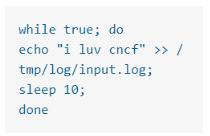
which should output logs to /tmp/log/input.log in plain text format, with example values:
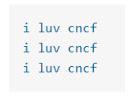
* The adapter-zen sidecar container should read /tmp/log/input.log and output the data to /tmp/log/output.* in Fluentd JSON format. Note that no knowledge of Fluentd is required to complete this task: all you will need to achieve this is to create the ConfigMap from the spec file provided at /opt/KDMC00102/fluentd-configma p.yaml , and mount that ConfigMap to /fluentd/etc in the adapter-zen sidecar container
Given a container that writes a log file in format A and a container that converts log files from format A to format B, create a deployment that runs both containers such that the log files from the first container are converted by the second container, emitting logs in format B.
Task:
* Create a deployment named deployment-xyz in the default namespace, that:
* Includes a primary
lfccncf/busybox:1 container, named logger-dev
* includes a sidecar Ifccncf/fluentd:v0.12 container, named adapter-zen
* Mounts a shared volume /tmp/log on both containers, which does not persist when the pod is deleted
* Instructs the logger-dev
container to run the command
which should output logs to /tmp/log/input.log in plain text format, with example values:
* The adapter-zen sidecar container should read /tmp/log/input.log and output the data to /tmp/log/output.* in Fluentd JSON format. Note that no knowledge of Fluentd is required to complete this task: all you will need to achieve this is to create the ConfigMap from the spec file provided at /opt/KDMC00102/fluentd-configma p.yaml , and mount that ConfigMap to /fluentd/etc in the adapter-zen sidecar container