Create a schema called bronze using location '/mnt/delta/bronze', and check if the schema exists before creating.
Correct Answer: A
Explanation https://docs.databricks.com/sql/language-manual/sql-ref-syntax-ddl-create-schema.html 1.CREATE SCHEMA [ IF NOT EXISTS ] schema_name [ LOCATION schema_directory ]
Question 117
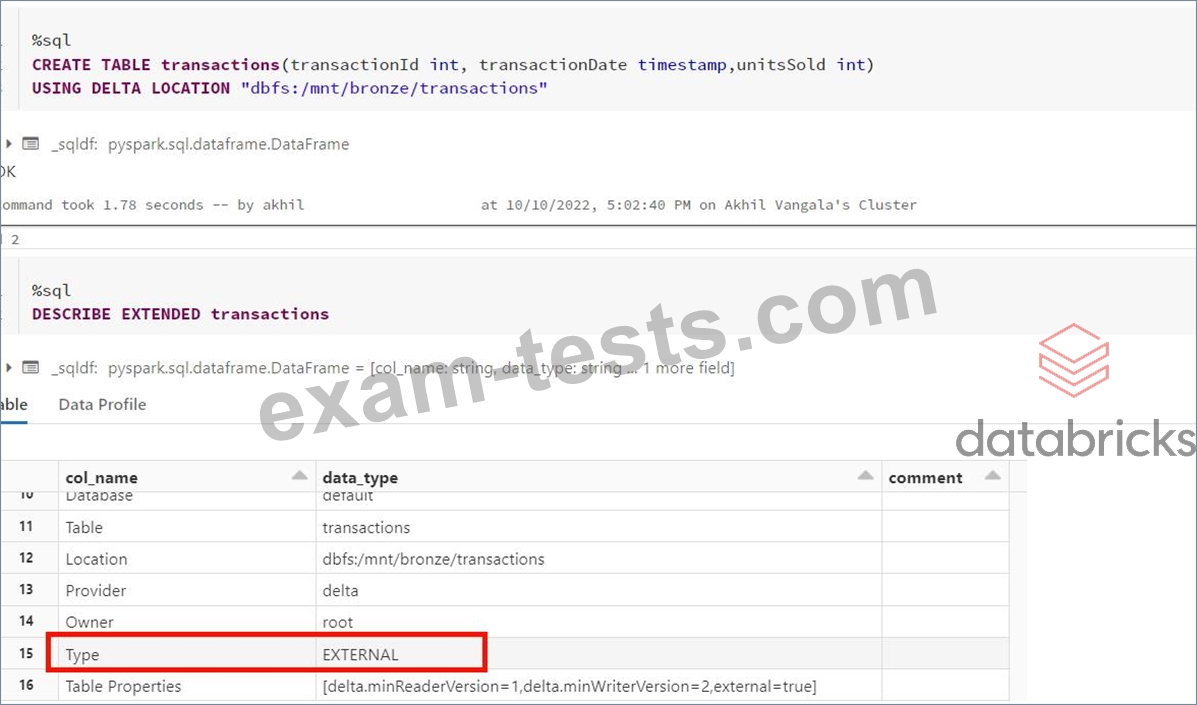
What type of table is created when you create delta table with below command? CREATE TABLE transactions USING DELTA LOCATION "DBFS:/mnt/bronze/transactions"
Correct Answer: B
Explanation Anytime a table is created using the LOCATION keyword it is considered an external table, below is the current syntax. Syntax CREATE TABLE table_name ( column column_data_type...) USING format LOCATION "dbfs:/" format -> DELTA, JSON, CSV, PARQUET, TEXT I created the table command based on the above question, you can see it created an external table,
Question 118
A table in the Lakehouse namedcustomer_churn_paramsis used in churn prediction by the machine learning team. The table contains information about customers derived from a number of upstream sources. Currently, the data engineering team populates this table nightly by overwriting the table with the current valid values derived from upstream data sources. The churn prediction model used by the ML team is fairly stable in production. The team is only interested in making predictions on records that have changed in the past 24 hours. Which approach would simplify the identification of these changed records?
Correct Answer: E
The approach that would simplify the identification of the changed records is to replace the current overwrite logic with a merge statement to modify only those records that have changed, and write logic to make predictions on the changed records identified by the change data feed. This approach leverages the Delta Lake features of merge and change data feed, which are designed to handle upserts and track row-level changes in a Delta table12. By using merge, the data engineering team can avoid overwriting the entire table every night, and only update or insert the records that have changed in the source data. By using change data feed, the ML team can easily access the change events that have occurred in the customer_churn_params table, and filter them by operation type (update or insert) and timestamp. This way, they can only make predictions on the records that have changed in the past 24 hours, and avoid re-processing the unchanged records. The other options are not as simple or efficient as the proposed approach, because: * Option A would require applying the churn model to all rows in the customer_churn_params table, which would be wasteful and redundant. It would also require implementing logic to perform an upsert into the predictions table, which would be more complex than using the merge statement. * Option B would require converting the batch job to a Structured Streaming job, which would involve changing the data ingestion and processing logic. It would also require using the complete output mode, which would output the entire result table every time there is a change in the source data, which would be inefficient and costly. * Option C would require calculating the difference between the previous model predictions and the current customer_churn_params on a key identifying unique customers, which would be computationally expensive and prone to errors. It would also require storing and accessing the previous predictions, which would add extra storage and I/O costs. * Option D would require modifying the overwrite logic to include a field populated by calling spark.sql. functions.current_timestamp() as data are being written, which would add extra complexity and overhead to the data engineering job. It would also require using this field to identify records written on a particular date, which would be less accurate and reliable than using the change data feed. References: Merge, Change data feed
Question 119
A data ingestion task requires a one-TB JSON dataset to be written out to Parquet with a target part-file size of 512 MB. Because Parquet is being used instead of Delta Lake, built-in file-sizing features such as Auto- Optimize & Auto-Compaction cannot be used. Which strategy will yield the best performance without shuffling data?
Correct Answer: A
For this scenario where a one-TB JSON dataset needs to be converted into Parquet format without employing Delta Lake's auto-sizing features, the goal is to avoid unnecessary data shuffles and yet ensure optimal file sizes for the output Parquet files. Here's a breakdown of why option A is most suitable: * Setting maxPartitionBytes:The spark.sql.files.maxPartitionBytes configuration controls the size of blocks that Spark reads from the data source (in this case, the JSON files) but also influences the output size of files when data is written without repartition or coalesce operations. Setting this parameter to 512 MB directly addresses the requirement to manage the output file size effectively. * Data Ingestion and Processing: * Ingesting Data:Load the JSON dataset into a DataFrame. * Applying Transformations:Perform any required narrow transformations that do not involve shuffling data (like filtering or adding new columns). * Writing to Parquet:Directly write the transformed DataFrame to Parquet files. The setting for maxPartitionBytes ensures that each part-file is approximately 512 MB, meeting the requirement for part-file size without additional steps to repartition or coalesce the data. * Performance Consideration:This approach is optimal because: * It avoids the overhead of shuffling data, which can be significant, especially with large datasets. * It directly ties the read/write operations to a configuration that matches the target output size, making it efficient in terms of both computation and I/O operations. * Alternative Options Analysis: * Option B and D:Involves repartitioning, which would trigger a shuffle of the data, contradicting the requirement to avoid shuffling for performance reasons. * Option C:Uses coalesce, which is less intensive than repartition but can still lead to uneven partition sizes and does not directly control the output file size as effectively as setting maxPartitionBytes. * Option E:Setting shuffle partitions to 512 doesn't directly control the output file size for writing to Parquet and could lead to smaller files depending on the dataset's partitioning post- transformations. References * Apache Spark Configuration * Writing to Parquet Files in Spark
Question 120
One of the queries in the Databricks SQL Dashboard takes a long time to refresh, which of the be-low steps can be taken to identify the root cause of this issue?
Correct Answer: E
Explanation The answer is, Use Query History, to view queries and select query, and check the query profile to see time spent in each step. Here is the view of the query profile, for more info use the link https://docs.microsoft.com/en-us/azure/databricks/sql/admin/query-profile As you can see here Databricks SQL query profile is much different to Spark UI and provides much more clear information on how time is being spent on different queries and time it spent on each step. Graphical user interface, application Description automatically generated