

Question 6
A company is using Dynamics 365 Sales to track their sales pipeline.
Sales managers require their forecasting to include reasons why opportunities were lost, including losses to competitors.
You need to configure the sales process WITHOUT using custom code.
What should you do? To answer, select the appropriate options in the answer area.
NOTE: Each correct selection is worth one point.

Sales managers require their forecasting to include reasons why opportunities were lost, including losses to competitors.
You need to configure the sales process WITHOUT using custom code.
What should you do? To answer, select the appropriate options in the answer area.
NOTE: Each correct selection is worth one point.

Question 7
A company's IT department has a .CSV file stored on one of their Shared Documents folders within their Microsoft SharePoint sites. The data from the .CSV file is ingested into Dynamics 365 Customer Insights - Data.
The file contains a row header and columns of different types, such as quantities and prices. The file also contains some rows with a high proportion of nulls.
You need to clean and transform the data in Customer Insights - Data to be ready for unification.
Solution: Transform the first row to be used as headers, define column types to be the appropriate field types and name the query. Select Next and your data is now ready for unification.
Does this meet the goal?
The file contains a row header and columns of different types, such as quantities and prices. The file also contains some rows with a high proportion of nulls.
You need to clean and transform the data in Customer Insights - Data to be ready for unification.
Solution: Transform the first row to be used as headers, define column types to be the appropriate field types and name the query. Select Next and your data is now ready for unification.
Does this meet the goal?
Question 8
You are a Dynamics 365 Sales administrator. You create a forecast by using the forecast category layout shown in the exhibit:

Use the drop-down menus to select the answer choice that answers each question based on the information presented in the graphic.
NOTE: Each correct selection is worth one point.
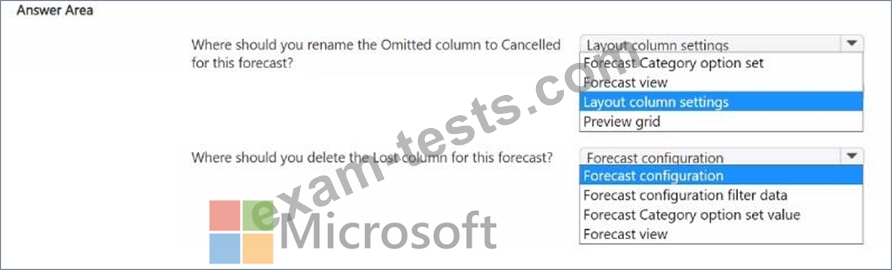
Use the drop-down menus to select the answer choice that answers each question based on the information presented in the graphic.
NOTE: Each correct selection is worth one point.

Question 9
Note: This question is part of a series of questions that present the same scenario. Each question in the series contains a unique solution. Determine whether the solution meets the stated goals. Some question sets might have more than one correct solution, while others might not have a correct solution.
After you answer a question in this section, you will NOT be able to return to it. As a result, these questions will not appear in the review screen.
You configure forecasts for a clothing manufacturer.
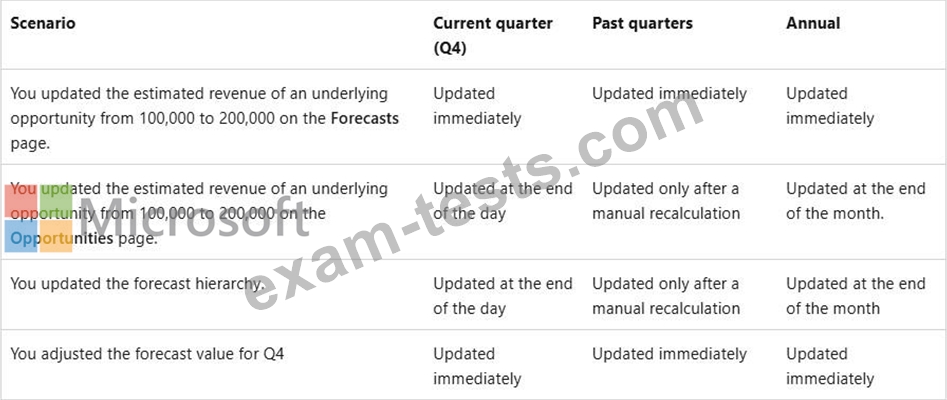
A salesperson updates an opportunity and wants to refresh the forecast
You need to show the salesperson how to refresh the forecast.
Solution: Update the Opportunity Forecast Category Mapping process.
Does this meet the goal?
After you answer a question in this section, you will NOT be able to return to it. As a result, these questions will not appear in the review screen.
You configure forecasts for a clothing manufacturer.
A salesperson updates an opportunity and wants to refresh the forecast
You need to show the salesperson how to refresh the forecast.
Solution: Update the Opportunity Forecast Category Mapping process.
Does this meet the goal?

Question 10
Case Study 1 - Contoso Ltd
Background information
Contoso Ltd. has started a new division that provides janitorial services to businesses.
The sales teams for this division are using a dedicated instance of Dynamics 365 Sales.
Contoso Ltd.'s sellers are becoming accustomed to Copilot in Sales and Sales Insights features.
They have identified several desired enhancements.
System configuration
The base currency for all opportunities in the system is US dollars (USD). The administrator has NOT enabled installed premium Sales Insights features. All users have Premium licenses.
Contoso Ltd. uses Exchange Online for email.
Only three default insights cards are turned on:
1. Close date coming soon
2. Meeting today
3. Upcoming meeting
The system administrator has set the following days before notifying me value for the Close date coming soon card to 21 days. Contoso Ltd. has also just set up Dynamics 365 Customer Insights
- Journeys for marketing automation. No segments or customer journeys have been defined yet.
Dynamics 365 Sales and Customer Insights - Journeys both share the same instance of Microsoft Dataverse.
Copilot in Dynamics 365 Sales settings
The following screenshots show the configured fields for opportunity settings summaries and recent changes in Copilot.


Contoso Ltd. Personnel
Business development managers
Contoso Ltd. has 30 business development managers (BDMs) across its sales teams. Each BDM is responsible for selling janitorial services to new and existing clients. All BDMs are assigned the sales manager security role in Dynamics 365 Sales.
Any BDM can own an opportunity, even if a different BDM owns the client account record. Any other BDMs assigned to work on the opportunity will be included in the opportunity record's sales team. Opportunity records owned by a BDM will never include any additional client stakeholders other than the named contact for the opportunity.
The BDMs have been told to document all client communications in Dynamics 365, but they frequently exchange emails with client contacts through Microsoft Exchange WITHOUT tracking them in Dynamics 365.
Digital sales team
Contoso Ltd. has a digital sales team that comprises 10 junior sales resources who focus on lead qualification and conversion to opportunities. Members of this team are assigned a single custom security role named Digital seller that is a copy of the standard Salesperson role. View audit history and view audit summary permissions are disabled.
The team currently receives leads from an online form on Contoso Ltd.'s website. Many online lead submissions end up being duplicates, and the team manually reconciles the duplicates by comparing last name, email address, and phone number for all submitted leads.
Clients
Client tiers
Clients are grouped into tiers based on annual revenue as calculated in a system outside Dynamics 365 Sales. Clients receive different levels of ongoing service and support based on their tier assignment.
Annual revenue values for accounts and corresponding tier values are written to Dynamics 365 through a nightly batch process. Client tier values are only updated when they change, and tier value will always be blank for accounts with no calculated annual revenue.
The tier structure is:
Tier A -- annual revenue greater than or equal to $10,000,000 USD
Tier B -- annual revenue greater than $5,000,000 USD and less than $10,000,000 USD Tier C -- annual revenue greater than $0 USD and less than or equal to $5,000,000 USD The tier label is stored in a custom text field named Client tier (contoso_clienttier) that contains only a single letter or is blank.
Northwind Traders account
There are three BDMs who frequently work together on large opportunities.
BDM1 is the account owner for Northwind Traders, a multinational client.
- BDM1 owns all Northwind Traders opportunities with estimated revenue greater than or equal to
$1,000,000. BMD2 and BDM3 are assisting BDM1 with several opportunities for Northwind Traders in different cities.
- BDM3 owns all other Northwind Traders opportunities. BDM3 is NOT a sales team member for any of the opportunities BDM1 owns.
- BDM2 is a sales team member for all Northwind Traders opportunities.
Client Contact1 is the primary contact for the Northwind Traders' account. There are two other client contacts with whom the Northwind account team regularly engages - Client Contact2 and Client Contact3.
BDM1 and Northwind Traders account
BDM1 has been on vacation for two weeks. During vacation, BDM1 did NOT log into Dynamics
365, and BDM2 made the following updates to several open Northwind Traders opportunities.

BMD2 also scheduled an internal meeting with BMD1 for the day they return to discuss a request from the primary contact for the account. The meeting has the "London office" opportunity as its regarding value.
Desired enhancements
The global sales lead requests the following enhancements:
1. A "Welcome" email should be sent to the primary contact for an account when the account first enters any client tier. This email should only be sent to the primary contact once.
2. Account owners should receive immediate notifications in the assistant in Dynamics 365 Sales when accounts change tiers. The notifications should include the account name and current tier.
3. A "Getting started" email should be sent to the main contact associated with an opportunity when the opportunity status is set to "Won."
1. The email should include a link to a custom onboarding form where the contact can supply information required to start the janitorial services for a given location.
2. If the contact does NOT click any links in the email, a follow-up email should be sent.
4. All emails between BDMs and client contacts should be available for relationship analytics KPIs. Emails sent by other users outside of Dynamics 365 should NOT be included in the KPIs.
The digital sales team lead requests the following enhancements:
1. The ability for team members to use Copilot to summarize changes to lead records.
2. Replace the current online form used by their team to capture new leads. The new form should automatically handle duplicates using the rules the team currently applies manually.
Drag and Drop Question
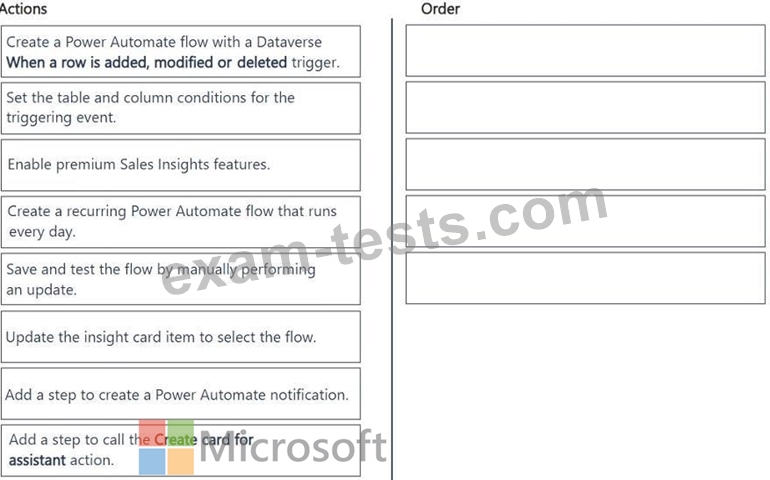
You need to create a custom insight card to display tier change notifications per the global sales lead's request.
Which five actions should you perform in sequence? To answer, move the five appropriate actions from the list of actions to the answer area. Arrange the five actions in the correct order.
Background information
Contoso Ltd. has started a new division that provides janitorial services to businesses.
The sales teams for this division are using a dedicated instance of Dynamics 365 Sales.
Contoso Ltd.'s sellers are becoming accustomed to Copilot in Sales and Sales Insights features.
They have identified several desired enhancements.
System configuration
The base currency for all opportunities in the system is US dollars (USD). The administrator has NOT enabled installed premium Sales Insights features. All users have Premium licenses.
Contoso Ltd. uses Exchange Online for email.
Only three default insights cards are turned on:
1. Close date coming soon
2. Meeting today
3. Upcoming meeting
The system administrator has set the following days before notifying me value for the Close date coming soon card to 21 days. Contoso Ltd. has also just set up Dynamics 365 Customer Insights
- Journeys for marketing automation. No segments or customer journeys have been defined yet.
Dynamics 365 Sales and Customer Insights - Journeys both share the same instance of Microsoft Dataverse.
Copilot in Dynamics 365 Sales settings
The following screenshots show the configured fields for opportunity settings summaries and recent changes in Copilot.
Contoso Ltd. Personnel
Business development managers
Contoso Ltd. has 30 business development managers (BDMs) across its sales teams. Each BDM is responsible for selling janitorial services to new and existing clients. All BDMs are assigned the sales manager security role in Dynamics 365 Sales.
Any BDM can own an opportunity, even if a different BDM owns the client account record. Any other BDMs assigned to work on the opportunity will be included in the opportunity record's sales team. Opportunity records owned by a BDM will never include any additional client stakeholders other than the named contact for the opportunity.
The BDMs have been told to document all client communications in Dynamics 365, but they frequently exchange emails with client contacts through Microsoft Exchange WITHOUT tracking them in Dynamics 365.
Digital sales team
Contoso Ltd. has a digital sales team that comprises 10 junior sales resources who focus on lead qualification and conversion to opportunities. Members of this team are assigned a single custom security role named Digital seller that is a copy of the standard Salesperson role. View audit history and view audit summary permissions are disabled.
The team currently receives leads from an online form on Contoso Ltd.'s website. Many online lead submissions end up being duplicates, and the team manually reconciles the duplicates by comparing last name, email address, and phone number for all submitted leads.
Clients
Client tiers
Clients are grouped into tiers based on annual revenue as calculated in a system outside Dynamics 365 Sales. Clients receive different levels of ongoing service and support based on their tier assignment.
Annual revenue values for accounts and corresponding tier values are written to Dynamics 365 through a nightly batch process. Client tier values are only updated when they change, and tier value will always be blank for accounts with no calculated annual revenue.
The tier structure is:
Tier A -- annual revenue greater than or equal to $10,000,000 USD
Tier B -- annual revenue greater than $5,000,000 USD and less than $10,000,000 USD Tier C -- annual revenue greater than $0 USD and less than or equal to $5,000,000 USD The tier label is stored in a custom text field named Client tier (contoso_clienttier) that contains only a single letter or is blank.
Northwind Traders account
There are three BDMs who frequently work together on large opportunities.
BDM1 is the account owner for Northwind Traders, a multinational client.
- BDM1 owns all Northwind Traders opportunities with estimated revenue greater than or equal to
$1,000,000. BMD2 and BDM3 are assisting BDM1 with several opportunities for Northwind Traders in different cities.
- BDM3 owns all other Northwind Traders opportunities. BDM3 is NOT a sales team member for any of the opportunities BDM1 owns.
- BDM2 is a sales team member for all Northwind Traders opportunities.
Client Contact1 is the primary contact for the Northwind Traders' account. There are two other client contacts with whom the Northwind account team regularly engages - Client Contact2 and Client Contact3.
BDM1 and Northwind Traders account
BDM1 has been on vacation for two weeks. During vacation, BDM1 did NOT log into Dynamics
365, and BDM2 made the following updates to several open Northwind Traders opportunities.
BMD2 also scheduled an internal meeting with BMD1 for the day they return to discuss a request from the primary contact for the account. The meeting has the "London office" opportunity as its regarding value.
Desired enhancements
The global sales lead requests the following enhancements:
1. A "Welcome" email should be sent to the primary contact for an account when the account first enters any client tier. This email should only be sent to the primary contact once.
2. Account owners should receive immediate notifications in the assistant in Dynamics 365 Sales when accounts change tiers. The notifications should include the account name and current tier.
3. A "Getting started" email should be sent to the main contact associated with an opportunity when the opportunity status is set to "Won."
1. The email should include a link to a custom onboarding form where the contact can supply information required to start the janitorial services for a given location.
2. If the contact does NOT click any links in the email, a follow-up email should be sent.
4. All emails between BDMs and client contacts should be available for relationship analytics KPIs. Emails sent by other users outside of Dynamics 365 should NOT be included in the KPIs.
The digital sales team lead requests the following enhancements:
1. The ability for team members to use Copilot to summarize changes to lead records.
2. Replace the current online form used by their team to capture new leads. The new form should automatically handle duplicates using the rules the team currently applies manually.
Drag and Drop Question
You need to create a custom insight card to display tier change notifications per the global sales lead's request.
Which five actions should you perform in sequence? To answer, move the five appropriate actions from the list of actions to the answer area. Arrange the five actions in the correct order.
